Accurately classifying parcels is a crucial step to enhance the precision of our final side classification. Given the complexity of urban parcel shapes, we categorized them into several types, each requiring a tailored classification function.
01.Duplicated Address Parcels
These are typically commercial/public parcels where multiple, separate parcels are recorded under the same address.
Figure 1: An example of duplicated parcels, created by Houpu Li02.Jagged Parcels
These parcels have highly irregular shapes, often characterized by more than six edges.
Figure 2: An example of jagged parcels, created by Houpu Li03.Regular Inside Parcels
These parcels are usually rectangular with four edges, the edge closest to the road that shares the same address typically running parallel to it.
Figure 3: An example of regular inside parcels, created by Houpu Li04.Regular Corner Parcels
These parcels also have four edges but include at least two exterior sides due to their corner positioning.
Figure 4: An example of regular corner parcels, created by Houpu Li05.Cul-de-sac Parcels
These parcels are typically situated at the end of a road and are oriented perpendicularly to the road.
Figure 5: An example of cul-de-sac standard parcels, created by Houpu Li06.Curve Parcels
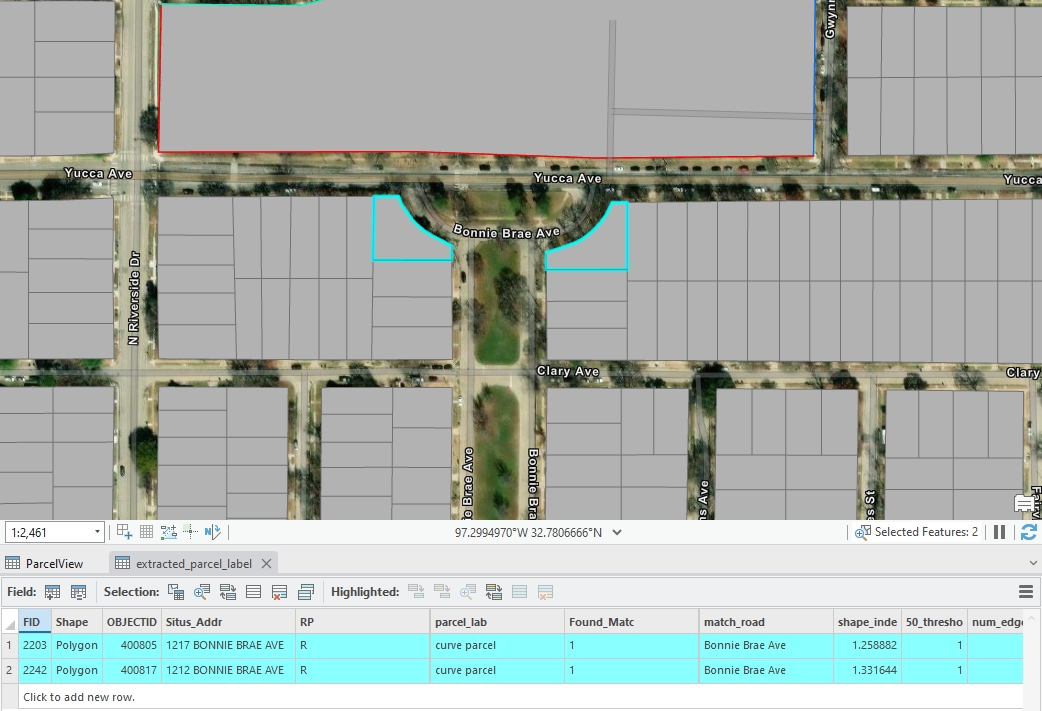
These parcels don’t belong to cul-de-sac parcels and have at least one curved edge.
Figure 6: An example of curve standard parcel, created by Houpu Li
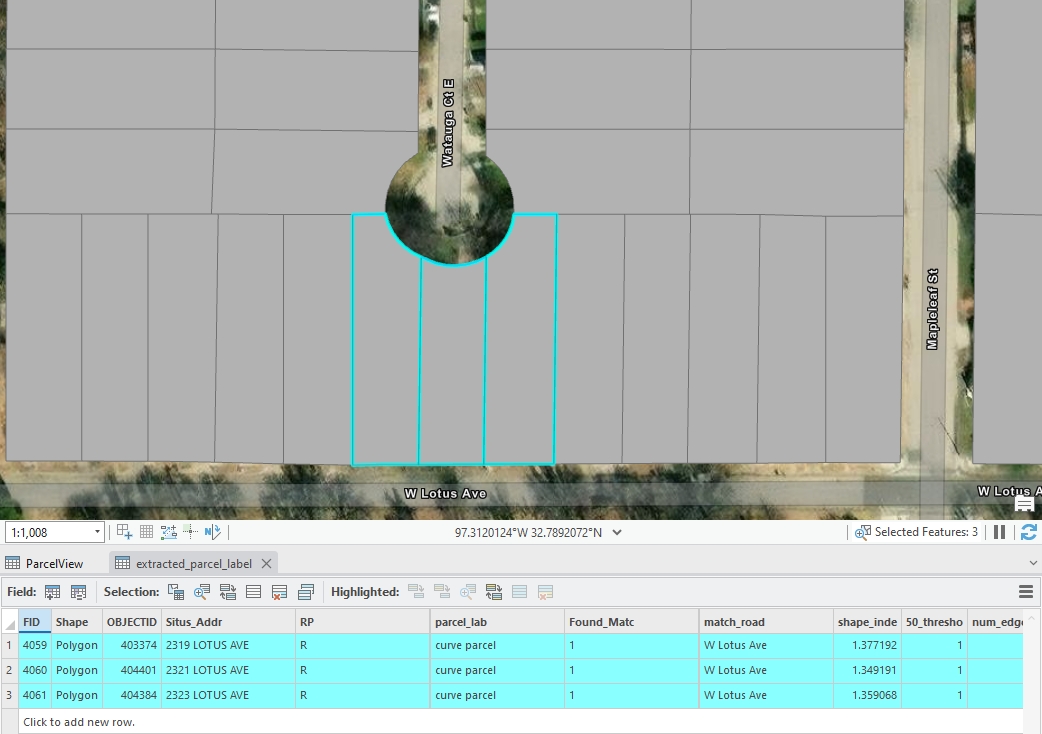
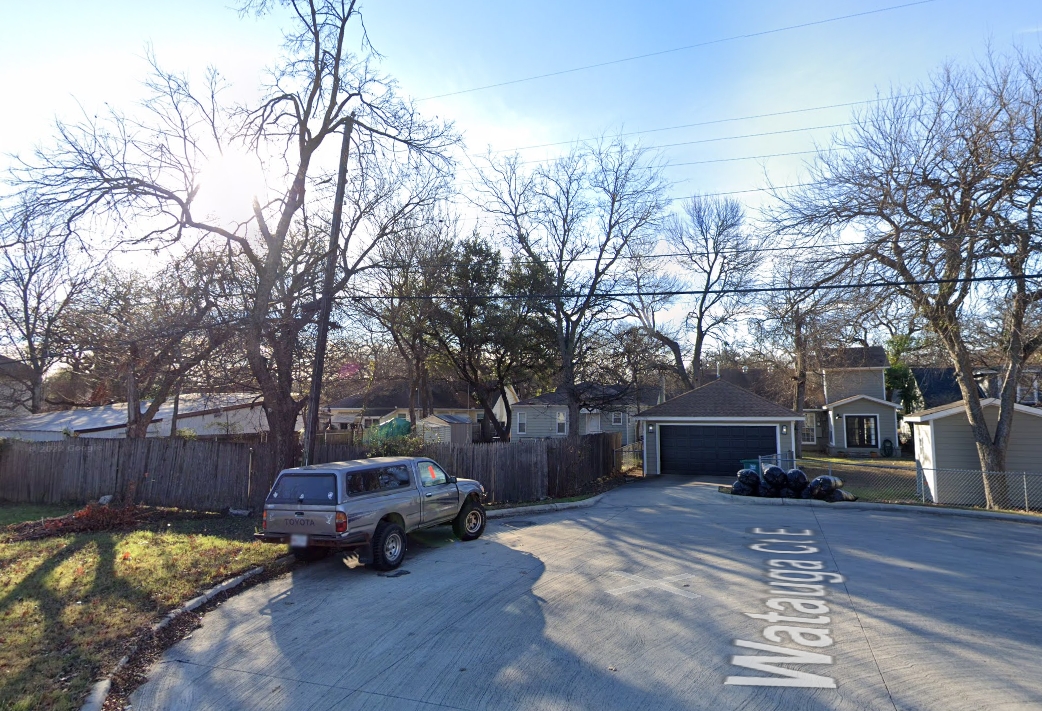
Some parcels appear to be cul-de-sac parcels, but they are not. Typically, they have different address names compared to the nearest perpendicular road segments. For those parcel,if they have a curve edge, it will classified into curve parcel
Figure 7: An example of curve parcel looks like cul-de-sac parcel, created by Houpu Li Figure 8: An example of google map for figure 7, created by Houpu Li07.Special Parcels
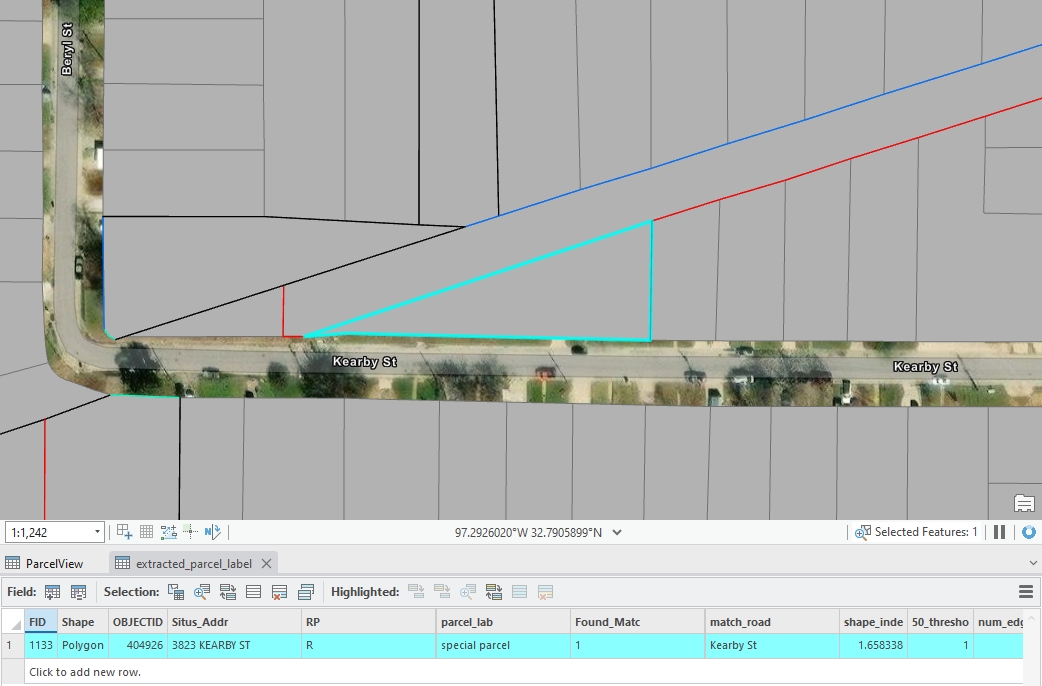
Parcels that do not conform to any of the above classifications are categorized as special parcels.
Figure 9: An example of special parcel, created by Houpu Li
Additionally, we have two other types of parcels:
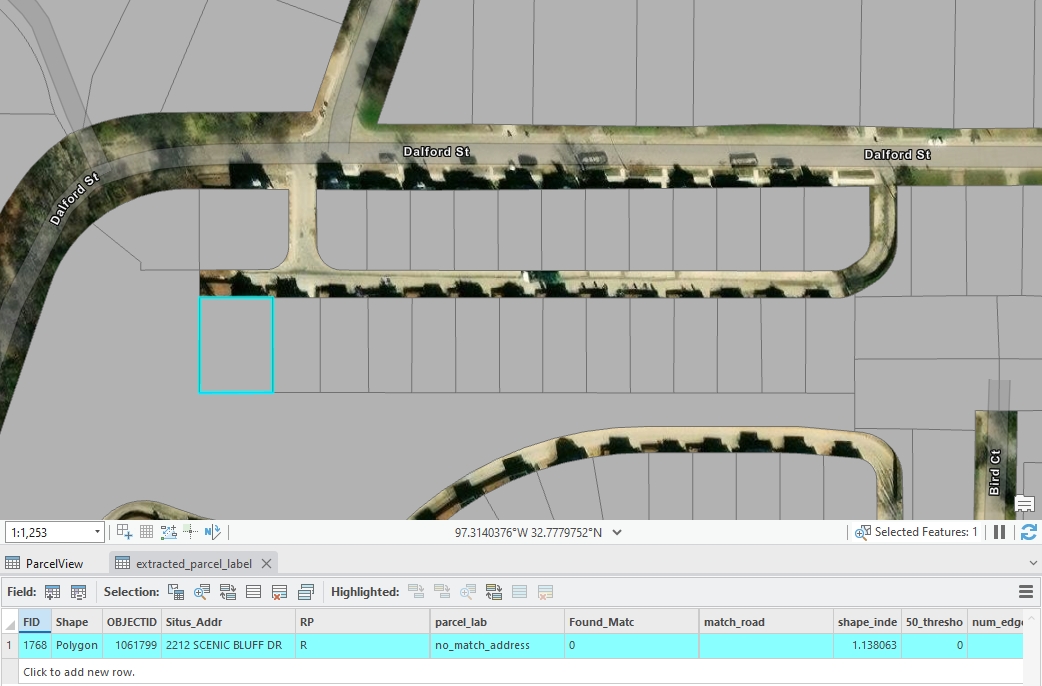
08.No Match Address Parcels
These parcels have address information but could not be matched to the road centerline dataset due to discrepancies between the two datasets.
Figure 10: An example of no match address parcels, created by Houpu Li09.No Address Parcels
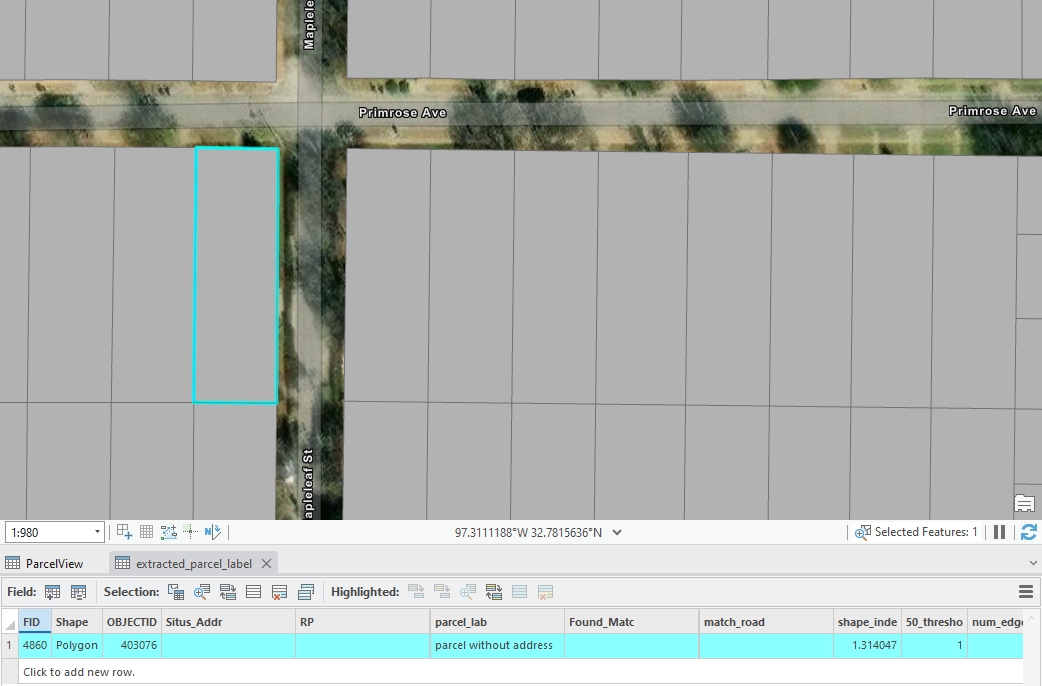
These parcels lack any address data, making them challenging to associate with a road centerline.
Figure 11: An example of no address parcels, created by Houpu Li
Note:
In this step 5 section, we define 9 main parcel classifications and we label those edges in them in Step 6 section seperately. However, in the Step 7: Generate Results section, several categories—specifically Cul-de-sac, Curve, Special, No Match Address, and No Address—are further subdivided into “standard” and “other” types for more detailed edge labeling. This futhur classification is based on observed results and refined rules, aiming to improve the accuracy and confidence of the edge labeling result.
Functions for Parcel Classification
We have already established the logic for parcel classification. The next step is to implement these logics using computer language.
01.Duplicated Address Parcels
The code identifies parcels with duplicated parcel_id values and labels them as duplicated address in the parcel_labeled column of the extracted_parcel GeoDataFrame.
Code
# Identify duplicated parcel_addr valuesduplicated_ids = parcel[parcel['parcel_addr'].notna() & parcel['parcel_addr'].duplicated(keep=False)]# updated those duplicated parcel_addr rows and lable them in the 'parcel_label' columnparcel.loc[parcel['parcel_addr'].isin(duplicated_ids['parcel_addr']), 'parcel_label'] ='duplicated address'
02.Jagged Parcels
The code calculates a shape_index (perimeter-to-area ratio) for each parcel in the extracted_parcel GeoDataFrame and indentifies parcels with a high shape index (greater than the 50th percentile) in a new column named 50_threshold. It then determines the number of edges for each parcel by grouping the parcel_seg GeoDataFrame by parcel_id. Finally, it labels parcels as jagged parcel in the parcel_labeled column if they meet all three criteria:
No previous label
High shape index
Having 6 or more edges.
This step helps identify irregularly shaped parcels with many edges, indicating complex geometries.
You can refer to the paper for a more detailed mathematical explanation of the shape index.
Code
# Perimeter-Area Ratio (Shape Index)parcel['shape_index'] = parcel['geometry'].length / (2* (3.14159* parcel['geometry'].area)**0.5)si_threshold =0.50column_name =f"{int(si_threshold *100)}_threshold"parcel[column_name] = parcel['shape_index'] > parcel['shape_index'].quantile(si_threshold)# Ensure the geometry is a Polygon type and calculate the number of edgesedge_count = parcel_seg.groupby('parcel_id').size().reset_index(name='num_edges')parcel = parcel.merge(edge_count, on='parcel_id', how='left')parcel['parcel_label'] = parcel.apply(lambda row: 'jagged parcel'if pd.isna(row['parcel_label']) and row[column_name] and row['num_edges'] >=6else row['parcel_label'], axis=1)
03&04.Regular Inside and Corner Parcels
Firstly, we need to identify regular parcels, and then further classify them into Inside Parcels and Corner Parcels.
Part I: Identify Regular Parcels
Step 1: Matching Parcel Edge with Road Geometries
Step 2: Calculating Angle Between Each Parcel Edge and Road Segment
Step 3: Selecting the Most Representative Angle within Each Parcel Group
Step 4: Creating Tangent Lines for Each Parcel Edge Endpoints
Step 5: Filtering Parcel Based on Tangent Angle Differences
Step 6: Labeling Regular Parcels Based on Angle and Edge Criteria
Part II: Classify into Inside and Corner Parcels
Step 7: Normalizing Line Segment Directions
Step 8: Detecting Shared Sides with Normalized Geometries
Step 9: Calculating the Number of Unique Edges in Each Parcel Group
Step 10: Labeling Regular Parcels as Inside or Corner Parcels
Part I: Identify Regular Parcels
We identify regular parcels based on the number of edges and the angles between them within each parcel group.
Step 1: Matching Parcel Edge with Road Geometries
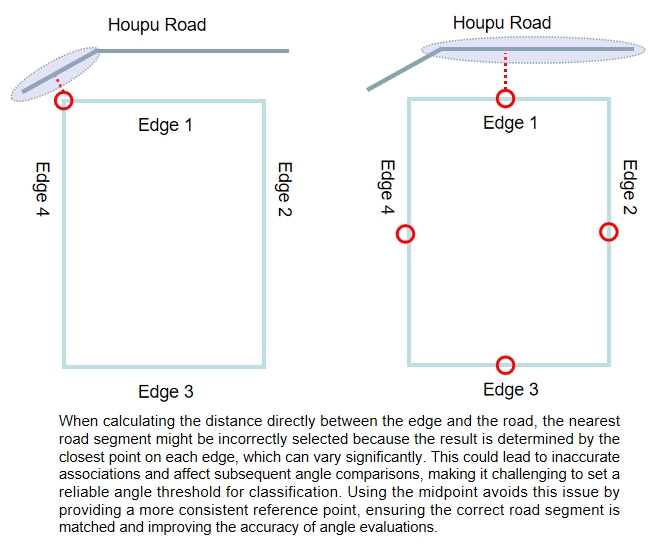
In this step, we identify the nearest road segment for each parcel edge using a combination of the match_road_address and the centroid of each parcel edge. The script iterates through parcel segments in each parcel group, calculating the distance from the each eage’s midpoint to nearest road segments. If a matching nearst road segment is found within the parcel group, its geometry is stored along with the calculated distance, ensuring that we have a reference for later angle comparisons.
Using the midpoint for distance calculation is essential because it provides a more consistent and reliable measurement. Calculating the distance directly between parcel edges and nearby roads can lead to ambiguous results due to varying edge orientations and lengths. Figure 12: An explaination for midpoint calculation, created by Houpu Li
Code
# parcel_seg_filter = parcel_seg[(parcel_seg['RP'] == 'R') & (parcel_seg['match_road_address'].notnull())]parcel_seg_filter = parcel_seg[parcel_seg['match_road_address'].notnull()]# Initialize lists to store the matched road geometries and distancesmatched_road_geometries = []midpoint_distances = []# Iterate over each row in parcel_seg_filterfor idx, parcel_row in parcel_seg_filter.iterrows(): match_addr = parcel_row['match_road_address']# Calculate the midpoint (centroid) of the parcel geometry midpoint = parcel_row.geometry.centroid# Filter road_seg to get rows where road_addr matches match_road_address matching_road_segs = road_seg[road_seg['road_addr'] == match_addr]ifnot matching_road_segs.empty:# Calculate distances between the midpoint of the parcel and matching road_seg geometries distances = matching_road_segs.geometry.apply(lambda geom: midpoint.distance(geom))# Find the index of the nearest road geometry nearest_index = distances.idxmin()# Append the nearest road geometry to the list matched_road_geometries.append(matching_road_segs.loc[nearest_index].geometry)# Append the corresponding distance (from midpoint to nearest road) to the list midpoint_distances.append(distances[nearest_index])else:# If no match is found, append None for both geometry and distance matched_road_geometries.append(None) midpoint_distances.append(None)# Add the matched road geometries and midpoint distances to parcel_seg_filterparcel_seg_filter['road_geometry'] = matched_road_geometriesparcel_seg_filter['midpoint_distance_to_road'] = midpoint_distances
Step 2: Calculating Angle Between Each Parcel Edge and Road Segment
Then, we calculate the angle differences between the each parcel edge and their corresponding nearest road segment by using a custom calculate_angle_difference function, which allows us to quantify how parallel or perpendicular each parcel edge is to its adjacent road. And we create a new column called angle_difference to store the results.
Code
# Create a new column to store the angle differences between geometry and road_geometryangle_differences = []# Iterate over each row and calculate the angle difference between geometry and road_geometryfor idx, row in parcel_seg_filter.iterrows(): parcel_geom = row['geometry'] road_geom = row['road_geometry']# Check if road_geometry is not Noneif road_geom isnotNone:# Calculate the angle difference angle_diff = calculate_angle_difference(parcel_geom, road_geom) angle_differences.append(angle_diff)else:# If no road_geometry is found, append None or 0 angle_differences.append(None)# Add the angle differences to a new column in parcel_seg_filterparcel_seg_filter['angle_difference'] = angle_differences
Step 3: Selecting the Most Representative Angle within Each Parcel Group
This step is to keep only the most representative edge per parcel by selecting the one with the minimum distance to the road. And then select the angle difference between this edge and corresponding nearst road segment as the most representative angle, which allows us to quantify how parallel or perpendicular each parcel is to its adjacent road.
Code
# selecting the most representative parcel edge for stored the geometry into parcel geodataframeparcel_seg_filter = parcel_seg_filter.loc[parcel_seg_filter.groupby('parcel_id')['midpoint_distance_to_road'].idxmin()]parcel = parcel.merge(parcel_seg_filter[['parcel_id', 'angle_difference']], on='parcel_id', how='left')
Step 4: Creating Tangent Lines for Each Parcel Edge Endpoints
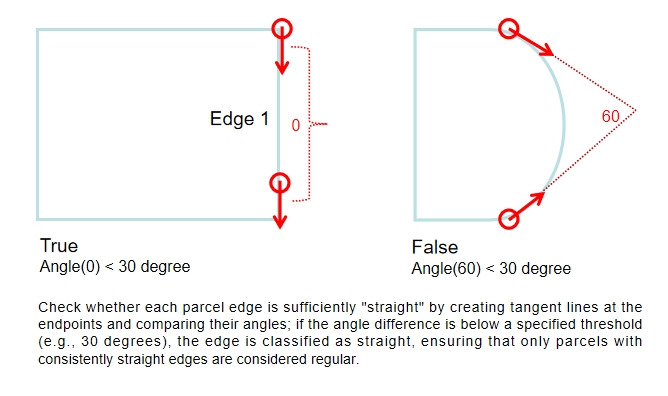
Basically, Steps 4 and 5 are used to check whether each parcel edge is enoughly “straight”, which ensures that only parcels with consistently straight edges are classified as regular parcels.In the step 4, we creates tangent lines at the start and end points of each parcel edge. In other words, this step involves generating two short line segments that extend from both ends of the original edge, which helps in calculating the change in direction at the endpoints.
Figure 13: An explaination for creating tangent line, created by Houpu Li
Code
# Function to create tangent lines at both ends of a line segmentdef create_tangents(line): coords =list(line.coords)iflen(coords) <2:returnNone, None# Skip invalid geometries# Create tangents at the start and end of the line segment start_tangent = LineString([coords[0], coords[1]]) end_tangent = LineString([coords[-2], coords[-1]])return start_tangent, end_tangent
Step 5: Filtering Parcel Based on Tangent Angle Differences
Compares the angles between these tangent lines to determine if the edge is “straight”. If the angle difference is below a certain threshold (e.g., 30 degrees), the edge is considered straight; otherwise, it is marked as irregular.
Code
# Filter parcel segments based on angle difference of tangents > 30 degreesdef filter_parcel_segments(parcel_seg, angle_threshold=30): filtered_segments = []for idx, row in parcel_seg.iterrows(): line = row['geometry'] start_tangent, end_tangent = create_tangents(line)if start_tangent and end_tangent: angle_diff = calculate_angle_difference(start_tangent, end_tangent)if angle_diff > angle_threshold:# Add the segment to the filtered list along with parcel_id and parcel_addr filtered_segments.append({'parcel_id': row['parcel_id'],'parcel_addr': row['parcel_addr'],'geometry': line })# Create a new DataFrame with the filtered results filtered_df = pd.DataFrame(filtered_segments)return filtered_df# Call the function to filter parcel segments based on angle difference of tangentsfiltered_parcel_seg = filter_parcel_segments(parcel_seg)
Step 6: Labeling Regular Parcels Based on Angle and Edge Criteria
The final step labels parcels as regular parcels if they meet several geometric and angular criteria:
Having exactly four edges.
Having a small angle difference (less than 15 degrees) between parcel and road geometries.
Each edge is sufficiently straight or rectangular.
Code
# Check if filtered_parcel_seg is non-emptyifnot filtered_parcel_seg.empty:# Get unique parcel_id values if filtered_parcel_seg has data filtered_object_ids = filtered_parcel_seg['parcel_id'].unique()# Update 'parcel_label' column with the exclusion condition parcel.loc[ (parcel['num_edges'] ==4) & (parcel['angle_difference'].notnull()) & (parcel['angle_difference'] <15) & (~parcel['parcel_id'].isin(filtered_object_ids)), # Exclude matching parcel_id'parcel_label' ] ='regular parcel'else:# Directly update 'parcel_label' without exclusion condition if filtered_parcel_seg is empty parcel.loc[ (parcel['num_edges'] ==4) & (parcel['angle_difference'].notnull()) & (parcel['angle_difference'] <15), 'parcel_label' ] ='regular parcel'
Part II: Classify into Inside and Corner Parcels
The next step is to classify the regular parcels into Inside Parcels and Corner Parcels based on the number of unique parcel edges and their spatial relationships.
Step 7: Normalizing Line Segment Directions
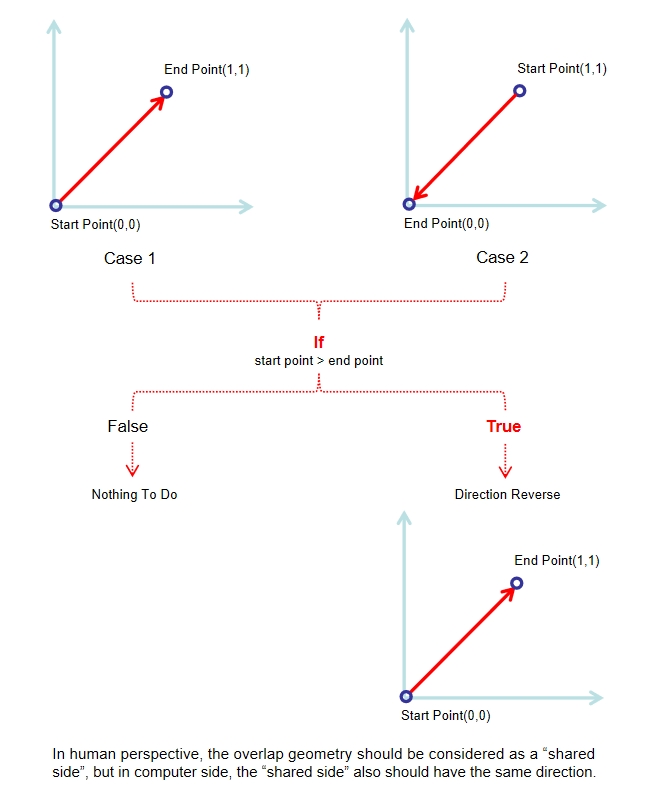
Basically, Steps 7 and 8 are used to check whether two edges are duplicates. Specifically, the step 7 involves defining a function normalize_linestring() that ensures all LineString geometries are ordered consistently, placing the smallest coordinate point first. In other words, if these two lines with overlap geometry but have different directions, one of them will be reversed, which allows us to compare the segments accurately. And the step 8: The function check_shared_sides_normalized() identifies shared sides among parcel edges by normalizing line geometries.
Figure 14: An explaination for normalizing line, created by Houpu Li
Code
def normalize_linestring(line):# Ensure the coordinates are in a consistent direction (smallest point first)ifisinstance(line, LineString): coords =list(line.coords)if coords[0] > coords[-1]: coords.reverse() # Reverse the order of coordinates to normalize the directionreturn LineString(coords)else:return line # If it's not a LineString, keep it as is
Step 8: Detecting Shared Sides with Normalized Geometries
The function check_shared_sides_normalized() identifies shared sides by calculating midpoints, and using a cKDTree for efficient neighbor searches. If two segments overlap by a proportion greater than a defined threshold, they are marked as shared sides. The output GeoDataFrame includes a new column shared_side to indicate whether a segment is shared. Specifically, for two line segments to be considered “shared sides” in this function, they must:
Overlap geometric
Have a significant portion of overlap (default: greater than 10% of line1 length).
Be close enough based on their midpoints (within distance_threshold).
Code
def check_shared_sides_normalized(parcel_seg, threshold=0.1, distance_threshold=100):""" Check for shared sides in parcel_seg using cKDTree for faster neighbor searches. Parameters: - parcel_seg: GeoDataFrame containing parcel segments. - threshold: float, minimum proportion of line length overlap to consider as a shared side. - distance_threshold: float, maximum distance between line segment midpoints to be considered for comparison. Returns: - parcel_seg: GeoDataFrame with 'shared_side' column indicating whether a side is shared. """# Normalize all the geometry objects parcel_seg['normalized_geom'] = parcel_seg['geometry'].apply(normalize_linestring)# Extract the midpoints of each line segment to build the KDTree midpoints = np.array([line.interpolate(0.5, normalized=True).coords[0] for line in parcel_seg['normalized_geom']])# Build cKDTree with midpoints kdtree = cKDTree(midpoints)# Initialize the 'shared_side' column as False parcel_seg['shared_side'] =False# Loop over each line and find nearby lines using KDTreefor i, line1 in parcel_seg.iterrows():# Query the KDTree for neighbors within the distance_threshold indices = kdtree.query_ball_point(midpoints[i], r=distance_threshold)for j in indices:if i != j: # Avoid comparing the line with itself line2 = parcel_seg.iloc[j] intersection = line1['normalized_geom'].intersection(line2['normalized_geom'])ifnot intersection.is_empty:# Calculate the proportion of overlap relative to the length of line1 overlap_ratio = intersection.length / line1['normalized_geom'].lengthif overlap_ratio > threshold:# If the overlap is greater than the threshold, mark as shared side parcel_seg.at[i, 'shared_side'] =True parcel_seg.at[j, 'shared_side'] =True# Remove the temporarily generated 'normalized_geom' column parcel_seg = parcel_seg.drop(columns=['normalized_geom'])return parcel_segparcel_seg = check_shared_sides_normalized(parcel_seg)
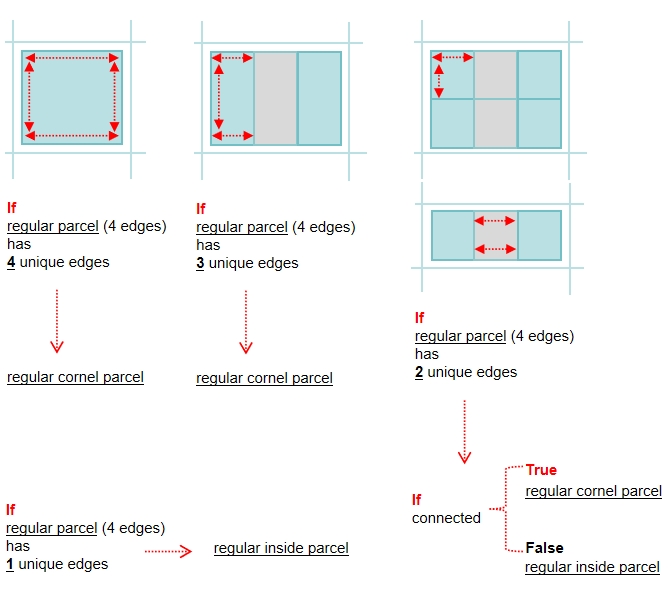
Step 9: Calculating the Number of Unique Edges in Each Parcel Group
This step counts the number of unique non-shared edges (shared_side=False) for each regular parcel group.
If a regular parcel(3 & 4 Edges) has exactly four unique edges, it should be considered as ‘regular corner parcel’.
If a regular parcel(4 Edges) has exactly one unique edges, it should be considered as ‘regular inside parcel’.
If a regular parcel(4 Edges) has exactly two unique edges, further analysis is conducted to determine if the two edges intersect. A new column, is_unique, is added to indicate whether these edges are truly adjacent unique or separate, forming the basis for distinguishing corner parcels from inside parcels.
Figure 15: An explaination for unique edges calculations, created by Houpu Li
Code
parcel_seg = parcel_seg.drop(columns=['parcel_label'])parcel_seg = parcel_seg.merge(parcel[parcel['parcel_label'] =='regular parcel'][['parcel_id','parcel_label']], on='parcel_id',how='left')# count the number of unique side in each regular parcelfalse_counts = parcel_seg[parcel_seg['parcel_label'] =='regular parcel'].groupby('parcel_id')['shared_side'].apply(lambda x: (x ==False).sum())# Create a DataFrame from the Seriesfalse_counts_df = false_counts.reset_index()false_counts_df.columns = ['parcel_id', 'unique_edge_count'] false_counts_df['unique_edges_bigger_2'] = false_counts_df['unique_edge_count'] >=2false_counts_df['is_unique'] = false_counts_df['unique_edges_bigger_2'] # Merge the counts back to the original GeoDataFrameparcel_seg = parcel_seg.merge(false_counts_df[['parcel_id','unique_edge_count','unique_edges_bigger_2']], on='parcel_id', how='left')# Step 1: Extract rows where unique_edge_count == 2filtered_seg = parcel_seg[parcel_seg['unique_edge_count'] ==2]# Step 2: Group by parcel_idgrouped = filtered_seg.groupby('parcel_id')# Function to check if two lines intersectdef check_intersection_for_group(group):# Find the two edges where shared_side is False within the group shared_sides = group[group['shared_side'] ==False]iflen(shared_sides) ==2:# Get the geometry (line) for both shared sides line1 = shared_sides.iloc[0]['geometry'] line2 = shared_sides.iloc[1]['geometry']# Check if the two lines intersect intersects = line1.intersects(line2)return intersectselse:returnNone# If there are not exactly two shared sides, skip calculation# Step 3: Check intersection for each group (parcel_id)results = []for parcel_id, group in grouped: intersects = check_intersection_for_group(group)if intersects isnotNone: results.append({'parcel_id': parcel_id, 'lines_intersect': intersects})# Convert results to a DataFrameintersection_df = pd.DataFrame(results)# Convert results to a DataFrame or handle as neededintersection_df = intersection_df[intersection_df['lines_intersect'] ==False]# Update the false_counts_df based on the intersection resultsfor i, row in intersection_df.iterrows(): false_counts_df.loc[false_counts_df['parcel_id'] == row['parcel_id'], 'is_unique'] = row['lines_intersect']
Step 10: Labeling Regular Parcels as Inside or Corner Parcels
Filtered regular parcels with four edges are labeled as either regular corner or inside parcel based on the is_unique column derived from the previous step. This final classification is applied to the original extracted_parcel GeoDataFrame.
Code
# Filter the parcel datafiltered_parcels = parcel.loc[ (parcel['parcel_label'] =='regular parcel') & (parcel['num_edges'] ==4)]# Merge the filtered parcels with false_counts_df based on parcel_idmerged_df = filtered_parcels.merge(false_counts_df[['parcel_id', 'is_unique']], on='parcel_id', how='left')# Update the parcel_label column based on the value of is_uniquemerged_df.loc[merged_df['is_unique'] ==True, 'parcel_label'] ='regular corner parcel'merged_df.loc[merged_df['is_unique'] ==False, 'parcel_label'] ='regular inside parcel'# Update the original parcel DataFramefor i, row in merged_df.iterrows(): parcel.loc[parcel['parcel_id'] == row['parcel_id'], 'parcel_label'] = row['parcel_label']
05.Labeled the Cul-de-sac Parcels
This process identifies and labels parcels that are located at the terminal ends of roads, known as cul-de-sac parcels. The procedure involves three main steps:
Step 1: Identify End Points
Step 2: Match Potential Cul-de-sac Parcels
Step 3: Label Cul-de-sac Parcels
Step 1: Identify End Points
This step extracts the start and end points for each road segment and determines which points are terminal end points by checking if they are only connected to one single road segment. And then, create a buffer(radius=35 meters) for those end road points, which will be used to identify potential cul-de-sac parcels in the subsequent steps.
Code
def identify_end_points(road_seg):# Get the start and end points of each road segment road_seg['start_point'] = road_seg['geometry'].apply(lambda geom: Point(geom.coords[0])) road_seg['end_point'] = road_seg['geometry'].apply(lambda geom: Point(geom.coords[-1]))# Create GeoDataFrames for start and end points, including road_addr and road_id start_points = road_seg[['road_addr', 'road_id', 'start_point']].rename(columns={'start_point': 'point'}) end_points = road_seg[['road_addr', 'road_id', 'end_point']].rename(columns={'end_point': 'point'})# Concatenate start and end points into a single GeoDataFrame all_points = gpd.GeoDataFrame(pd.concat([start_points, end_points]), geometry='point')# Count how many times each point appears (indicating road connections) point_counts = all_points.groupby('point').size().reset_index(name='count')# Filter points that appear only once (end points connected to a single road) end_points = point_counts[point_counts['count'] ==1]# Merge back road_addr and road_id to end points end_points = pd.merge(end_points, all_points[['road_addr', 'road_id', 'point']], on='point', how='left')# Convert to a GeoDataFrame, using 'point' as the geometry end_points = gpd.GeoDataFrame(end_points, geometry='point', crs=road_seg.crs)return end_points# Use the function to get endpoints that connect to only one road, including road_addr and road_idend_points = identify_end_points(road_seg)# Create a buffer for the end road segments (35m)end_points_buffer = gpd.GeoDataFrame(end_points.copy(), geometry=end_points.geometry.buffer(35), crs=end_points.crs)# Drop the 'point' column if no longer neededend_points_buffer.drop(columns=['point'], inplace=True)
Step 2: Match Potential Cul-de-sac Parcels
This step checks which parcels intersect with the buffered areas of end road points. Then those parcels are filtered(match_road_address) to ensure that the each potential parcel has the same address with end road segment, which ensures that only parcels directly adjacent to road segment end points are considered for cul-de-sac labeling.
Code
# Check if each parcel in 'parcel' intersects with 'road_seg_end_buffer'intersections = gpd.sjoin(parcel, end_points_buffer, how="inner", predicate="intersects")intersections = intersections.set_crs(crs=parcel.crs)# Filter parcels where the 'match_road_address' matches the 'road_addr' in 'road_seg_end_buffer'filtered_parcels_seg = intersections[intersections['match_road_address'] == intersections['road_addr']]
Step 3: Label Cul-de-sac Parcels
If a potential parcel has more than 4 edges, it will be classified as a Cul-de-sac parcel.
Code
def label_end_road_parcels(parcel, filtered_parcels_seg, filtered_object_ids):# Create a mask to identify rows in parcel that match parcel_id and parcel_addr matching_rows = parcel.merge( filtered_parcels_seg[['parcel_id', 'parcel_addr']], on=['parcel_id', 'parcel_addr'], how='inner' )# Update the 'parcel_label' column to 'end_road_parcel' for matched rows# Only if num_edges > 4 or parcel_id is in filtered_object_ids parcel.loc[ (parcel['parcel_id'].isin(matching_rows['parcel_id']) & parcel['parcel_addr'].isin(matching_rows['parcel_addr'])) & ((parcel['num_edges'] >4) | parcel['parcel_id'].isin(filtered_object_ids)), 'parcel_label' ] ='cul_de_sac parcel'return parcel# Call the function to label the end_road_parcel rows only if both filtered_parcels_seg and filtered_object_ids are non-emptyifnot filtered_parcels_seg.empty andlen(filtered_object_ids) >0: parcel = label_end_road_parcels(parcel, filtered_parcels_seg, filtered_object_ids)
06.Label the Curve Parcels
In Step 5, we created tangent lines at the start and end points of each edge and calculated the angles between them to determine whether each boundary is sufficiently “straight.” This step aims to identify parcels with curved boundaries based on those results and assign appropriate labels.
Code
def label_special_parcels(parcel, filtered_parcel_seg):# Create a mask to identify rows in parcel that match parcel_id and parcel_addr matching_rows = parcel.merge( filtered_parcel_seg[['parcel_id', 'parcel_addr']], on=['parcel_id', 'parcel_addr'], how='inner' )# Update the 'parcel_label' column to 'special parcel' # only for rows where 'parcel_label' is null parcel.loc[ parcel['parcel_label'].isnull() &# Check for null values parcel['parcel_id'].isin(matching_rows['parcel_id']) & parcel['parcel_addr'].isin(matching_rows['parcel_addr']), 'parcel_label' ] ='curve parcel'return parcel# Call the function to label special parcels only if filtered_parcel_seg is non-emptyifnot filtered_parcel_seg.empty: parcel = label_special_parcels(parcel, filtered_parcel_seg)
07.label the Special Parcels
The remaining parcels are classified as special parcels.
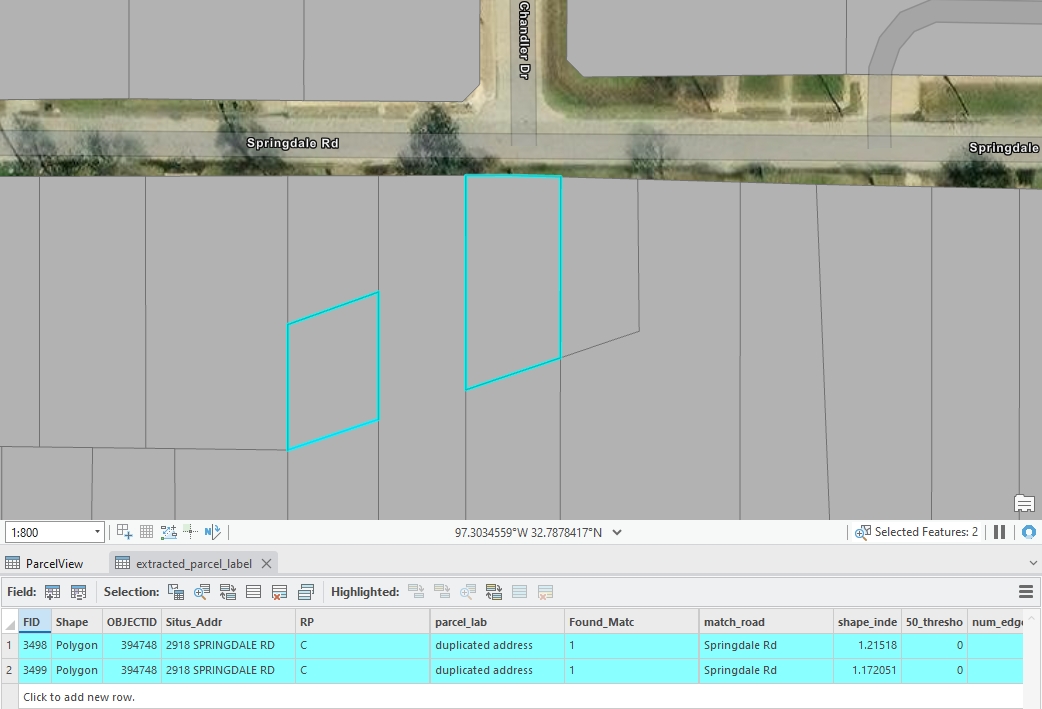

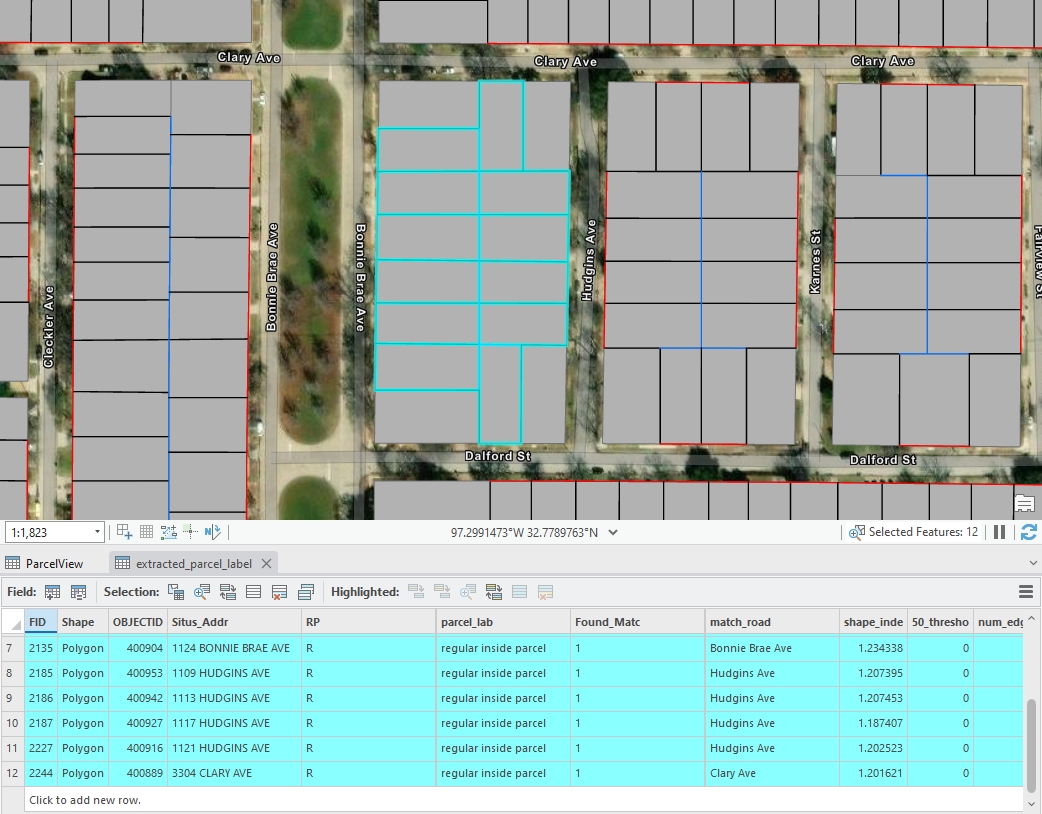
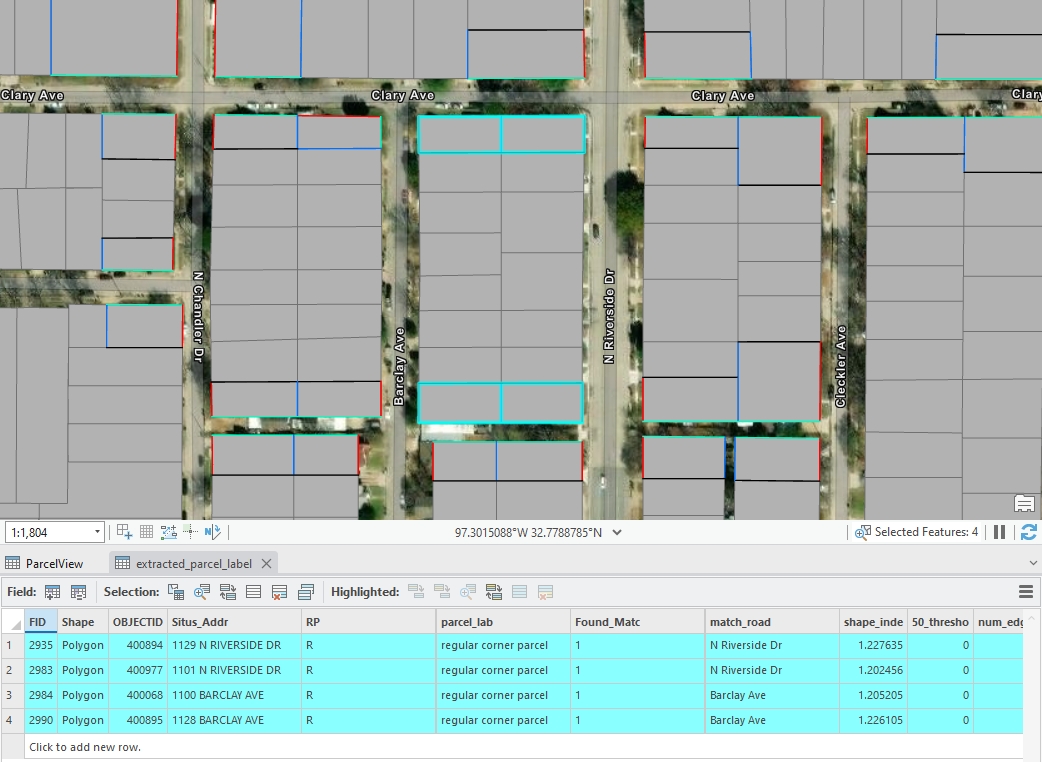
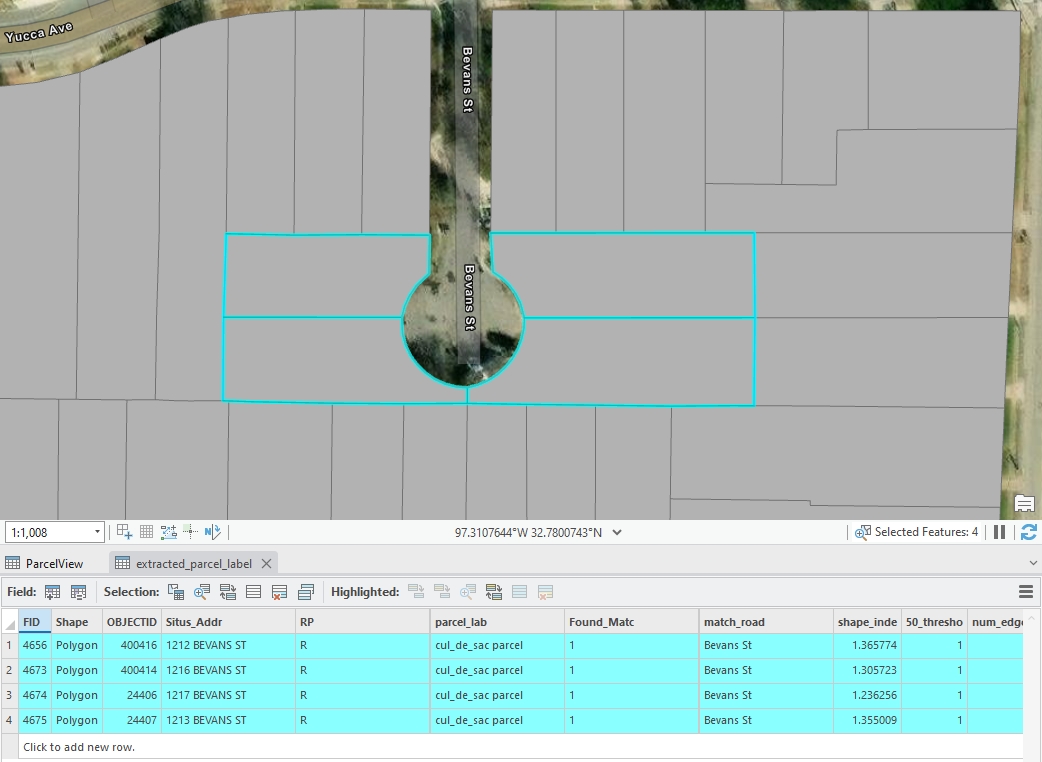 Figure 5: An example of cul-de-sac standard parcels, created by Houpu Li